

Supervisord
Supervisor(d) is a process control system that allows you to run, monitor, and manage long-running programs on your server. It starts configured processes, keeps them running, restarts them if they fail, and provides command-line tools for checking status, stopping, starting, and restarting services. It is commonly used to manage application workers, background jobs, and other supporting processes in a simple and consistent way.
Enabling it via the TurboStack Platform
You can enable this setting by going to your server in the TurboStack Platform, then going to Advanced > Operating System. Here you'll find the Supervisord Support slider.
After enabling this setting, publish the config to start the installation.
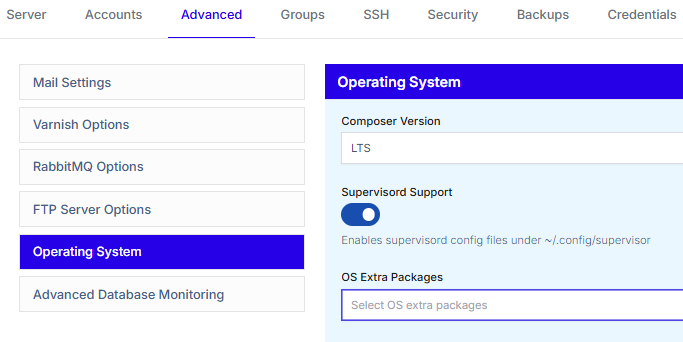
Enabling it via the YAML editor
You can enable this setting by adding the following to your TurboStack config:
supervisor_enabled: trueAfter adding the above config, publish the config to start the installation.
Configuring your services
Supervisord services work via .conf files. These files can be found in the ~/.config/supervisor/conf.d/ directory.
The Logs can be found in the ~/.config/supervisor/log/ directory.
An example of a .conf file:
[program:messenger-consume]
command=php /var/www/<USER>/current/bin/console messenger:consume async failed hello_retail --time-limit=3600 --memory-limit=512M
user=<USER>
numprocs=4
startsecs=0
autostart=true
autorestart=true
process_name=%(program_name)s_%(process_num)02d
stdout_logfile=/var/www/<USER>/.config/supervisor/log/messenger-consume.log
stderr_logfile=/var/www/<USER>/.config/supervisor/log/messenger-consume.error.logNote: A config sample can also be found at ~/.config/supervisor/conf.d/00-sample.conf.sample.
Enabling your services
After creating your service file, you will now need to enable it. You can do so with the following commands:
supervisorctl reread
supervisorctl update
This will read all the config files in the conf.d directory and enable them.
Managing your services
You can use the supervisorctl command to manage and troubleshoot your services.
Display all processes and their status:
supervisorctl statusStart a process:
supervisorctl start <process_name>Stop a process:
supervisorctl stop <process_name>Restart a process:
supervisorctl restart <process_name>Tail the logs of a process:
supervisorctl tail -f <process_name>