
Configure PHP on TurboStack
Each application chooses its own PHP version and, optionally, its PHP-FPM and OPcache tuning.
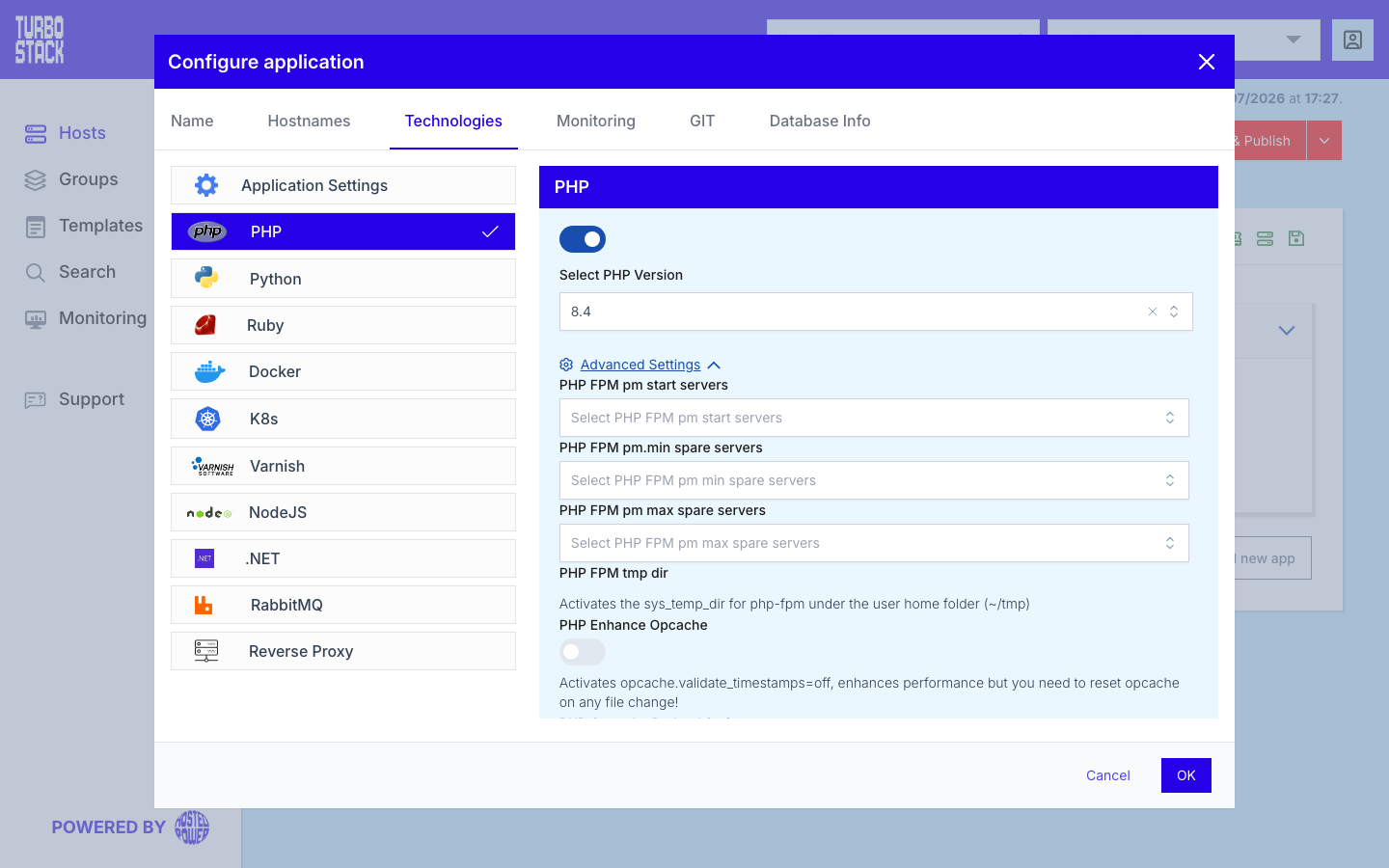
Where to configure it
PHP is configured per application:
- Open the application.
- Go to Configure application > Technologies > PHP.
- Select the PHP version (and adjust advanced settings if needed).
Installed versions and the host default come from the host-level php_versions
and php_main_version settings.
YAML configuration
Required
Optional
A PHP-FPM worker is one PHP process that handles one request at a time, so the number of workers sets how many PHP requests the application can serve at once.
# Per-application
php_version: "8.4"

# Optional PHP-FPM tuning
php_fpm_pm_start_servers: 5
php_fpm_pm_min_spare_servers: 3
php_fpm_pm_max_spare_servers: 6
# php_fpm_pm_max_children: 40      # ceiling on concurrent workers
# php_fpm_pm_max_requests: 500     # restart a worker after this many requests
# php_user_tmp_dir: true           # a private tmp folder for this application

# Optional OPcache + ionCube
php_enhance: true
php_opcache_preload_script: "/var/www/prod/preload.php"
php_ioncube_enabled: false

# Host-level
php_versions:
  - "8.3"
  - "8.4"
php_main_version: "8.4"
Note
Each application runs in its own PHP-FPM pool, so php_version and the PHP-FPM tuning
keys apply independently per site. Set php_versions at the host before a
application can select that version.
Worker ceiling and recycling
php_fpm_pm_max_children is the hard limit on how many requests this application can process at
the same time. Every worker holds its own memory, so the ceiling multiplied by the memory a request
uses is the worst case for this application. Set it too high and a traffic peak pushes the host out
of memory; set it too low and requests queue and time out. See
Out of memory and
Performance tuning.
php_fpm_pm_max_requests restarts a worker after that many requests. Restarting reclaims whatever
the process leaked, which keeps a slowly growing application stable without a scheduled restart.
Both are inherited from the host when you leave them out, so set them per application only when one site needs to differ from the rest.
A private temporary folder
With php_user_tmp_dir: true the application gets its own tmp folder under its home directory,
owned by its own user, and PHP's sys_temp_dir points at it. Without it, applications share the
system temporary folder. Turn it on when several applications run on one host and you do not want
uploads, sessions or generated files landing in a place another application can read.
OPcache preloading
Normally PHP loads the parts of your framework it needs on every request. Preloading loads them once, when PHP starts, and keeps them in memory for every request after that. For a framework that supports it, such as Symfony or Laravel, that is a noticeable speed gain.
Point php_opcache_preload_script at the script your framework provides:
php_opcache_preload_script: "/var/www/prod/preload.php"Three rules decide whether it works at all:
-
One application per PHP version. PHP loads exactly one preload script per PHP version, for the whole server. If two applications on the same PHP version both set the key, the deployment stops with an error. Give one of them a different
php_version, or set the key on only one. -
The file must exist when you publish, or the deployment fails.
-
Preloading is available on the platform's standard Linux hosts, not on control-panel hosts.
Applying a change
This is the part that surprises people, so it is worth being precise. Two different things can change, and they need different actions.
Publishing does not help in the second case, because nothing in your host configuration changed - only a file on disk. And preloaded code is deliberately held outside the normal OPcache, so clearing that cache does not refresh it either.
# You edited /var/www/prod/preload.php. Apply it:
sudo systemctl reload php8.4-fpm.service
The reload takes about a tenth of a second and serves visitors throughout. It applies to every application on that PHP version - see Administrator access.
What does not work
Tip
To check that preloading is actually active, have your application run
print_r(opcache_get_status()['preload_statistics']);. If the key is missing, PHP is not
preloading anything.
Common tasks
Related
- What is PHP?
- Applications: Technologies
- Applications overview
- TurboStack CLI - clear OPcache (
tscli opcache clear) and manage Blackfire