
API reference
The TurboStack API lets you read and manage Clients, Groups and Hosts programmatically - the same objects you manage in the TurboStack Platform - and read the security findings, Health analysis and monitoring state of your hosts. Use it to automate configuration changes and deployments from your own tooling, or to feed your own dashboards.
- Base URL (Uniform Resource Locator):
https://my.turbostack.app - Version:
v1- every path is under/api/v1 - Format: JSON request and response bodies
- Auth: an HTTP Bearer token on every request, except the public
service status check
Interactive API explorer (Swagger)
The platform ships an interactive Swagger UI, a user interface (UI) where you can browse every
endpoint, see its parameters and response schema, and try calls live. Open it at
/swagger; the full machine-readable spec is at
/api-docs/api-docs.json.
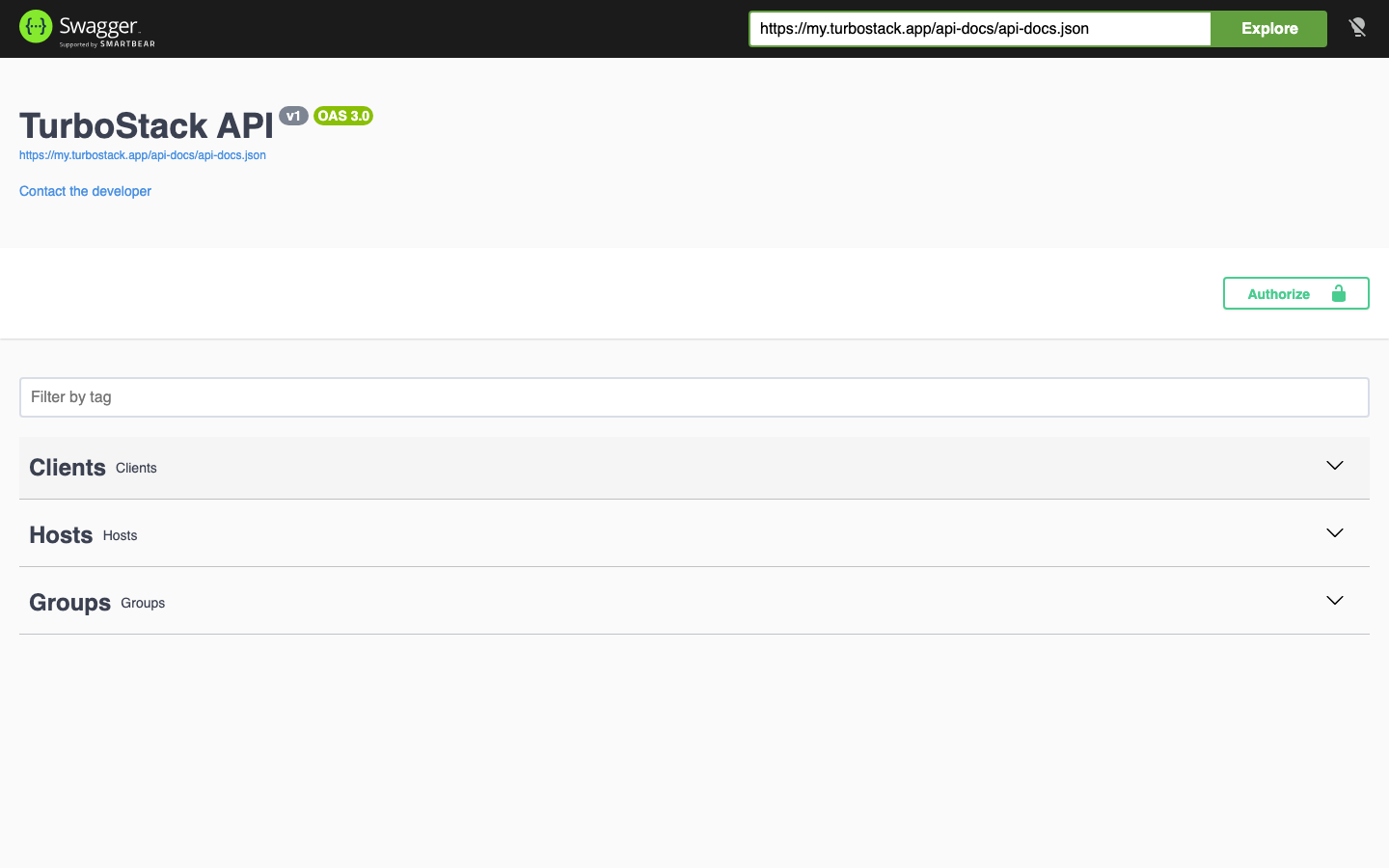
The Analysis group in the explorer is used by Hosted Power staff. A customer token receives
403 there.
Tip
The Swagger UI and the OpenAPI spec are the authoritative, always-current reference. This page covers every endpoint with ready-to-use examples; consult the spec for the exact, up-to-date schema of every field.
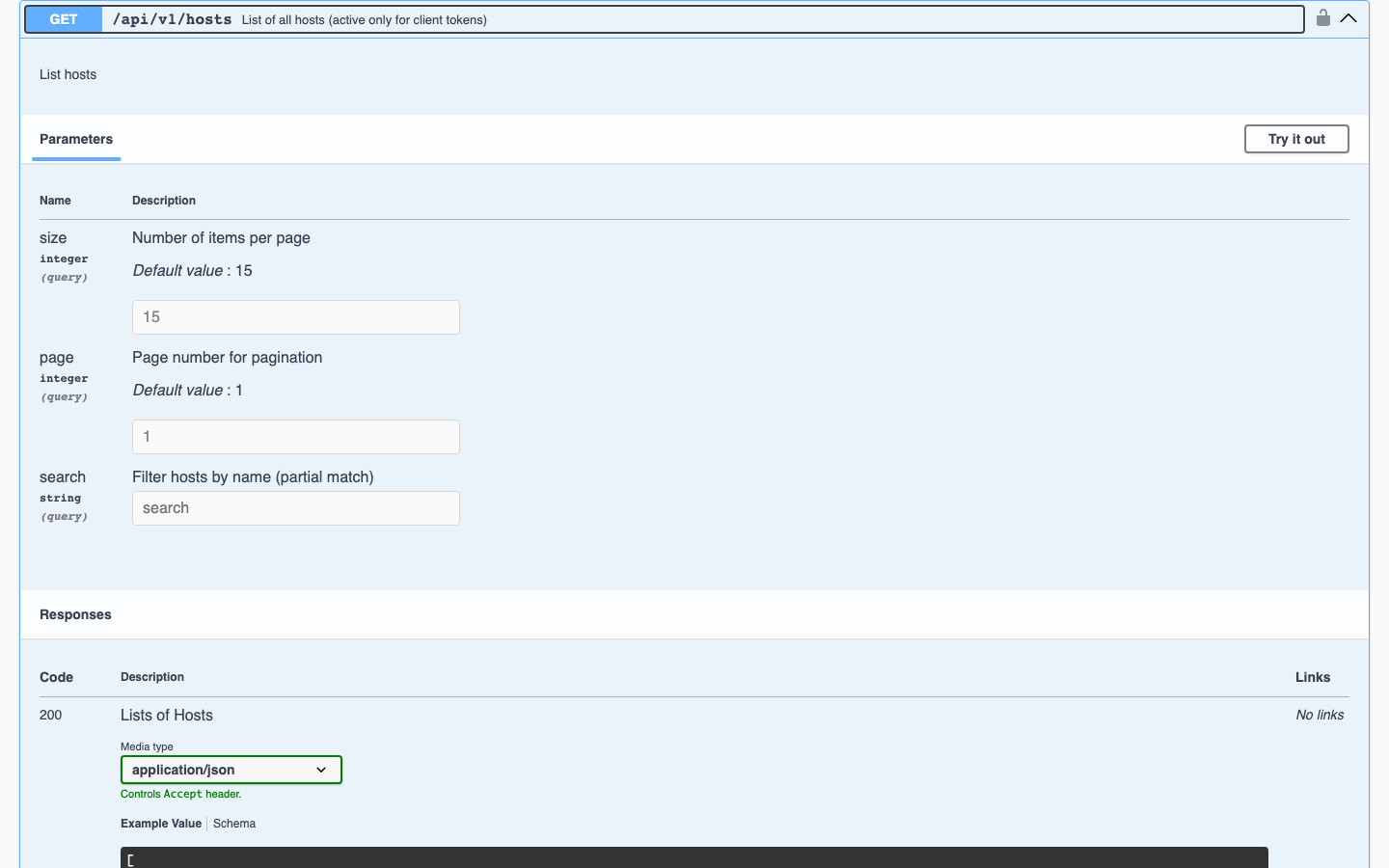
Expand an endpoint to see its parameters with their defaults and its response codes and example payloads; Try it out sends a live request from the browser.
Authentication
Every endpoint except GET /api/v1/healthAuthorization: Bearer <token> header:
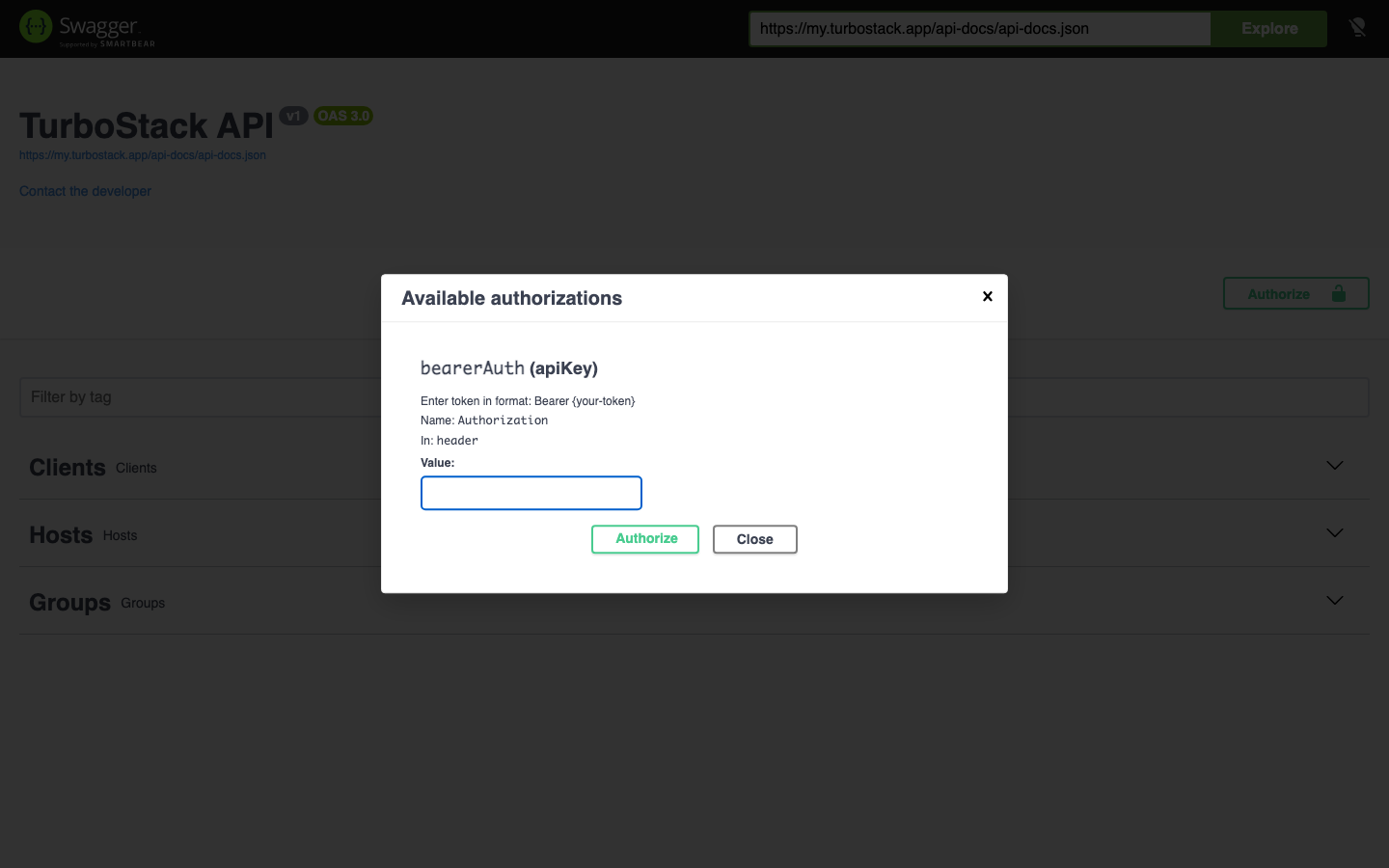
Authorization: Bearer <token>Create a token under API tokens in your Profile Settings. In Swagger UI,
click Authorize and enter Bearer <token>.
A token created from your account carries the client-access ability. It reaches the clients, groups
and hosts your account can see, and their findings, Health and monitoring data. The ability is set
when the token is created and cannot be changed.
Important
Treat your API token as a secret. Anyone with it can read and modify your clients, groups and hosts, read the security findings of your hosts and start scans. Store it in an environment variable and never commit it to source control.
Request logging
Every authenticated API request is recorded for 90 days. The record holds the time, method, path and query string, the host ID in the path, the response status and duration, the IP address and user agent, and the token's owner, name, ID and abilities. Request and response bodies are never recorded, so a configuration you send or a credential you read stays out of the log. Hosted Power uses these records to trace problems and misuse. They are not shown in the TurboStack Platform. Keep secrets out of query strings.
A change you make with a token appears in the host's History under your account's email address with an API badge that carries the token's name. Give each integration its own, recognizable token name.
Rate limit
The API accepts 6000 requests per minute, counted per token owner (or per IP address for an unauthenticated request). That is generous enough that normal integrations never reach it.
Go over it and the API answers 429 Too Many Requests with a Retry-After header telling you how
many seconds to wait. The response also carries X-RateLimit-Limit and X-RateLimit-Remaining, so
you can back off before you get there.
One endpoint has its own, stricter limit: a rescan request
(POST /api/v1/threat-center/{id}/rescan
The limit is about protecting the platform, not about pacing your work. If you are close to it, the
usual cause is polling in a tight loop. A deployment takes minutes, so check its status every few
seconds at most - see
Setup for the examples
The PHP and Python samples below assume this one-time setup. The cURL samples read the token from
the TURBOSTACK_API_TOKEN environment variable.
export TURBOSTACK_API_TOKEN="<your-token>"<?php
// Minimal client (cURL, no dependencies). Reused by every PHP sample below.
function ts(string $method, string $path, ?array $body = null): array
{
$base = 'https://my.turbostack.app';
$token = getenv('TURBOSTACK_API_TOKEN'); // never hard-code your token
$ch = curl_init($base . $path);
$headers = ["Authorization: Bearer {$token}", "Accept: application/json"];
curl_setopt($ch, CURLOPT_RETURNTRANSFER, true);
curl_setopt($ch, CURLOPT_CUSTOMREQUEST, $method);
if ($body !== null) {
$headers[] = "Content-Type: application/json";
curl_setopt($ch, CURLOPT_POSTFIELDS, json_encode($body));
}
curl_setopt($ch, CURLOPT_HTTPHEADER, $headers);
$res = curl_exec($ch);
$status = curl_getinfo($ch, CURLINFO_HTTP_CODE);
curl_close($ch);
if ($status >= 400) {
throw new RuntimeException("TurboStack API error: HTTP {$status} - {$res}");
}
return json_decode($res, true) ?? [];
}import os
import requests
BASE = "https://my.turbostack.app"
session = requests.Session()
session.headers.update({
"Authorization": f"Bearer {os.environ['TURBOSTACK_API_TOKEN']}", # never hard-code your token
"Accept": "application/json",
})The configuration model
Host and group configuration uses the same desired-state model as the TurboStack Platform. Where the
Platform shows it as YAML (the Source (YAML) view), the API represents it
as JSON. You read the current state with a GET and submit changes by POSTing an updated JSON
body. Every key of that model is listed in the
YAML configuration reference, including which level it belongs to and
what it changes on the server.
Note
Saving configuration with a POST describes the desired state; it does not deploy by itself. You
must trigger a deployment to apply it - see the
Pagination
The list endpoints for clients, hosts and groups return a paginated response. The items are under
the data array, alongside pagination metadata:
{
  "data": [ ],
  "current_page": 1,
  "per_page": 15,
  "total": 42,
  "last_page": 3
}
Control paging with the page and size query parameters, and narrow the results with search.
To walk every page, request page=1 and keep incrementing page until current_page equals
last_page. A page beyond the last one is not an error: it returns 200 with an empty data.
Note
Deduplicate on id, and do not read total as a count of hosts or groups. The host and group
lists are joined to the accounts that can see them, so an entry comes back once per account that
shares its customer id. An account with sub-accounts therefore repeats the same host several
times, across page boundaries as well, and total counts those repeated rows. Collect the pages,
collapse them on id, and count what is left.
The truncated to true when more exist. The
page and
per_page (1 to 100, default 25), and return the items under data with a meta object holding
page, per_page, total and last_page.
Clients
A client is an account that owns groups and hosts.
GET
/api/v1/clients
List all clients you can access. The result is a paginated list (see
Query parameters
curl "https://my.turbostack.app/api/v1/clients?page=1&size=50&search=acme" \
  -H "Authorization: Bearer $TURBOSTACK_API_TOKEN" \
  -H "Accept: application/json"
$clients = ts('GET', '/api/v1/clients?page=1&size=50&search=acme');clients = session.get(
f"{BASE}/api/v1/clients",
params={"page": 1, "size": 50, "search": "acme"},
).json()Response 200
{
  "data": [
    { "id": 7, "firstname": "Ada", "lastname": "Lovelace", "email": "ada@acme.example" },
    { "id": 8, "firstname": "Alan", "lastname": "Turing", "email": "alan@example.test" }
  ],
  "current_page": 1,
  "per_page": 50,
  "total": 2,
  "last_page": 1
}
GET
/api/v1/clients/{id}
Fetch one client by its id.
Path parameters
curl "https://my.turbostack.app/api/v1/clients/7" \
  -H "Authorization: Bearer $TURBOSTACK_API_TOKEN" \
  -H "Accept: application/json"
$client = ts('GET', '/api/v1/clients/7');client = session.get(f"{BASE}/api/v1/clients/7").json()Response 200
{ "id": 7, "firstname": "Ada", "lastname": "Lovelace", "email": "ada@acme.example" }
GET
/api/v1/clients/{id}/hosts
List the active hosts that belong to a client. The result is a paginated list (see
Note
Deactivated hosts are never returned, for any token. Every active value in the response is
therefore 1, and there is no parameter to include the inactive ones.
Path parameters
Query parameters
curl "https://my.turbostack.app/api/v1/clients/7/hosts?page=1&size=50&search=shop" \
  -H "Authorization: Bearer $TURBOSTACK_API_TOKEN" \
  -H "Accept: application/json"
$hosts = ts('GET', '/api/v1/clients/7/hosts?page=1&size=50&search=shop');hosts = session.get(
f"{BASE}/api/v1/clients/7/hosts",
params={"page": 1, "size": 50, "search": "shop"},
).json()Response 200
{
  "data": [
    { "id": 123, "client_id": 7, "active": 1, "name": "shop-production" }
  ],
  "current_page": 1,
  "per_page": 50,
  "total": 1,
  "last_page": 1
}
GET
/api/v1/clients/{id}/groups
List the groups that belong to a client. The result is a paginated list (see
Path parameters
Query parameters
curl "https://my.turbostack.app/api/v1/clients/7/groups?page=1&size=50&search=security" \
  -H "Authorization: Bearer $TURBOSTACK_API_TOKEN" \
  -H "Accept: application/json"
$groups = ts('GET', '/api/v1/clients/7/groups?page=1&size=50&search=security');groups = session.get(
f"{BASE}/api/v1/clients/7/groups",
params={"page": 1, "size": 50, "search": "security"},
).json()Response 200
{
  "data": [
    { "id": 42, "client_id": 7, "name": "shared-security" }
  ],
  "current_page": 1,
  "per_page": 50,
  "total": 1,
  "last_page": 1
}
Hosts
A host is a server you configure and deploy. Its configuration uses the
GET
/api/v1/hosts
List all active hosts. The result is a paginated list (see search parameter.
Note
Deactivated hosts are never returned, for any token - an admin token included. Every active
value in the response is therefore 1, and there is no parameter to include the inactive ones.
Query parameters
curl "https://my.turbostack.app/api/v1/hosts?page=1&size=50&search=shop" \
  -H "Authorization: Bearer $TURBOSTACK_API_TOKEN" \
  -H "Accept: application/json"
$hosts = ts('GET', '/api/v1/hosts?page=1&size=50&search=shop');hosts = session.get(
f"{BASE}/api/v1/hosts",
params={"page": 1, "size": 50, "search": "shop"},
).json()Response 200
Each host carries its configuration under the json key and a live monitoring object.
{
  "data": [
    {
      "id": 123,
      "client_id": 7,
      "active": 1,
      "name": "shop-production",
      "json": { "webserver": "nginx", "mysql_version": "8.4", "redis_enabled": true },
      "monitoring": { "load": {}, "disk": {}, "memory": {} }
    }
  ],
  "current_page": 1,
  "per_page": 50,
  "total": 1,
  "last_page": 1
}
GET
/api/v1/hosts/{id}
Fetch one host's full configuration (the desired-state model).
Path parameters
curl "https://my.turbostack.app/api/v1/hosts/123" \
  -H "Authorization: Bearer $TURBOSTACK_API_TOKEN" \
  -H "Accept: application/json"
$host = ts('GET', '/api/v1/hosts/123');host = session.get(f"{BASE}/api/v1/hosts/123").json()Response 200
The configuration model is returned under the json key.
{
  "id": 123,
  "client_id": 7,
  "active": 1,
  "name": "shop-production",
  "json": {
    "webserver": "nginx",
    "mysql_version": "8.4",
    "redis_enabled": true
  },
  "monitoring": { "load": {}, "disk": {}, "memory": {} }
}
POST
/api/v1/hosts/{id}
Update a host's configuration. The request body wraps the configuration model in a json key (the
same model as the Source view). This saves the desired state; it does not deploy on its own.
Path parameters
curl -X POST "https://my.turbostack.app/api/v1/hosts/123" \
  -H "Authorization: Bearer $TURBOSTACK_API_TOKEN" \
  -H "Content-Type: application/json" \
  -d '{ "json": { "webserver": "nginx", "mysql_version": "8.4", "redis_enabled": true } }'
$updated = ts('POST', '/api/v1/hosts/123', [
'json' => [
'webserver' => 'nginx',
'mysql_version' => '8.4',
'redis_enabled' => true,
],
]);updated = session.post(
f"{BASE}/api/v1/hosts/123",
json={"json": {"webserver": "nginx", "mysql_version": "8.4", "redis_enabled": True}},
).json()Response 200
{ "message": "Host saved successfully" }Note
Saving does not apply the change. Trigger a deployment to apply it - see the next endpoint and Publishing changes.
POST
/api/v1/hosts/{id}/deploy
Start a deployment of the host, applying its saved configuration. The request body must specify the
deployment type.
Path parameters
Request body
deploy- a standard deploy of the current configuration.fullDeploy- a full deploy that re-applies the complete configuration.fullDeleteDeploy- a full deploy that also removes resources no longer in the configuration.
curl -X POST "https://my.turbostack.app/api/v1/hosts/123/deploy" \
  -H "Authorization: Bearer $TURBOSTACK_API_TOKEN" \
  -H "Content-Type: application/json" \
  -d '{ "type": "deploy" }'
$deploy = ts('POST', '/api/v1/hosts/123/deploy', ['type' => 'deploy']);deploy = session.post(
f"{BASE}/api/v1/hosts/123/deploy",
json={"type": "deploy"},
).json()Response 200
{ "message": "Deploy started" }Note
If the host is already deploying, the endpoint returns 400 with
{ "error": "Host is currently deploying" }. A host whose order is still being processed cannot
be deployed yet. The request then fails with the message This host cannot be deployed until order #<number> is accepted.
GET
/api/v1/hosts/{id}/deploy
Get the status of the host's most recent deployment.
Path parameters
curl "https://my.turbostack.app/api/v1/hosts/123/deploy" \
  -H "Authorization: Bearer $TURBOSTACK_API_TOKEN" \
  -H "Accept: application/json"
$status = ts('GET', '/api/v1/hosts/123/deploy');status = session.get(f"{BASE}/api/v1/hosts/123/deploy").json()Response 200
{
  "publishing": true,
  "publishing_status": "deploy",
  "is_deploying": true,
  "job_stdout": "",
  "deploy_at": null,
  "deploy_type": "Deploy"
}
Response fields
Values of publishing_status
Tip
To wait for a deployment, poll this endpoint and stop when publishing_status is one of the
finished values, or when is_deploying is false. Do not poll faster than once every few
seconds; a deployment takes minutes, not milliseconds.
A deployment that stops reporting progress for more than five minutes is set to timeout
automatically, and publishing goes back to false so a new deployment can start. That is a
safeguard against a host being locked by a deployment that never reports back - it does not
necessarily mean the work on the server failed. Check the host's
Publishing history before you retry, or read it over the API with
GET /api/v1/hosts/{id}/history/deploys
If the host has no deploy history, the endpoint returns 404 with
{ "error": "No deploy history found" }.
DELETE
/api/v1/hosts/{id}/deploy
Reset a stuck deploy state so a new deployment can be triggered. It marks the host's most recent
deployment as no longer active: publishing becomes false and publishing_status keeps its last
value. Nothing that is still running on the server is stopped. Use it when a deployment stays
marked as running after the work on the server has clearly ended. Check the host's
History first.
Path parameters
curl -X DELETE "https://my.turbostack.app/api/v1/hosts/123/deploy" \
  -H "Authorization: Bearer $TURBOSTACK_API_TOKEN" \
  -H "Accept: application/json"
$reset = ts('DELETE', '/api/v1/hosts/123/deploy');reset = session.delete(f"{BASE}/api/v1/hosts/123/deploy").json()Response 200
{ "message": "Deploy reset" }A host that has never been deployed returns 404 with { "error": "No deploy history found" }.
GET
/api/v1/hosts/{id}/history/revisions
The host's configuration history, the same list as the Revisions tab of History. Newest first. Consecutive saves that belong to one change are grouped into one entry.
Path parameters
Query parameters
curl "https://my.turbostack.app/api/v1/hosts/123/history/revisions?per_page=10" \
  -H "Authorization: Bearer $TURBOSTACK_API_TOKEN" \
  -H "Accept: application/json"
$revisions = ts('GET', '/api/v1/hosts/123/history/revisions?per_page=10');revisions = session.get(f"{BASE}/api/v1/hosts/123/history/revisions", params={"per_page": 10}).json()Response 200
{
  "data": [
    {
      "id": 9876,
      "author": "user@example.com",
      "api_token": "deploy-bot",
      "published": true,
      "reverted": false,
      "from_group": false,
      "deploy_tags": ["mysql"],
      "changes": [
        { "path": "/mysql_version", "old": "8.0", "new": "8.4" }
      ],
      "created_at": "2026-10-08T12:15:24+02:00"
    }
  ],
  "meta": { "page": 1, "per_page": 10, "total": 42, "last_page": 5 }
}
api_token is the name of the token that made the change, or null for a change made in the
TurboStack Platform. deploy_tags lists the parts of the configuration the change touches. An empty
list means the next publish is a full deploy. Timestamps carry the platform's time zone offset, as
in the example.
GET
/api/v1/hosts/{id}/history/deploys
The deployment log of the host, the same as the Deploys tab. Same path and query parameters as the revisions list.
curl "https://my.turbostack.app/api/v1/hosts/123/history/deploys" \
  -H "Authorization: Bearer $TURBOSTACK_API_TOKEN" \
  -H "Accept: application/json"
$deploys = ts('GET', '/api/v1/hosts/123/history/deploys');deploys = session.get(f"{BASE}/api/v1/hosts/123/history/deploys").json()Response 200
{
  "data": [
    {
      "id": 5551,
      "author": "user@example.com",
      "deploy_type": "Deploy",
      "components": ["mysql"],
      "status": "published",
      "started_at": "2026-10-08T12:16:02+02:00",
      "finished_at": "2026-10-08T12:19:40+02:00",
      "job_stdout": "..."
    }
  ],
  "meta": { "page": 1, "per_page": 25, "total": 3, "last_page": 1 }
}
status takes the same values as publishing_status of
GET /api/v1/hosts/{id}/deploydeploy, published, error,
canceled, timeout or import. finished_at is null while a deploy runs. job_stdout holds
the full output of the job.
GET
/api/v1/hosts/{id}/history/cloning
The account clones recorded for the host, the same as the Cloning tab. Same path and query parameters as the revisions list.
curl "https://my.turbostack.app/api/v1/hosts/123/history/cloning" \
  -H "Authorization: Bearer $TURBOSTACK_API_TOKEN" \
  -H "Accept: application/json"
$clones = ts('GET', '/api/v1/hosts/123/history/cloning');clones = session.get(f"{BASE}/api/v1/hosts/123/history/cloning").json()Response 200
{
  "data": [
    {
      "id": 77,
      "author": "user@example.com",
      "clone_type": "production_to_staging",
      "source_host": "web1.example.com",
      "source_username": "prod",
      "destination_username": "stag",
      "clone_files": true,
      "clone_database": true,
      "parameters": { },
      "created_at": "2026-09-30T09:12:00+02:00"
    }
  ],
  "meta": { "page": 1, "per_page": 25, "total": 1, "last_page": 1 }
}
GET
/api/v1/hosts/{id}/history/actions
The actions taken on the host, the same as the Actions tab: today the monitoring pauses made with Pause Downtime Monitoring. Same path and query parameters as the revisions list.
curl "https://my.turbostack.app/api/v1/hosts/123/history/actions" \
  -H "Authorization: Bearer $TURBOSTACK_API_TOKEN" \
  -H "Accept: application/json"
$actions = ts('GET', '/api/v1/hosts/123/history/actions');actions = session.get(f"{BASE}/api/v1/hosts/123/history/actions").json()Response 200
{
  "data": [
    {
      "id": 12,
      "action": "pause_downtime_monitoring",
      "author": "user@example.com",
      "status": "resumed",
      "starts_at": "2026-10-26T14:45:10+02:00",
      "ends_at": "2026-10-26T15:45:10+02:00",
      "ended_at": "2026-10-26T15:02:31+02:00",
      "ended_by": "user@example.com"
    }
  ],
  "meta": { "page": 1, "per_page": 25, "total": 1, "last_page": 1 }
}
Values of status
Common to the four History endpoints
-
An unknown host returns
404with{ "error": "Host not found" }. A host of another account returns403with{ "error": "Forbidden" }. -
A page past the last one returns
200with an emptydata. -
With a customer token, changes made by Hosted Power show the author
Hosted Power, and theirapi_tokenis an empty string.
GET
/api/v1/hosts/{id}/credentials
Get the host's connection credentials. Sensitive - handle the response securely.
Path parameters
curl "https://my.turbostack.app/api/v1/hosts/123/credentials" \
  -H "Authorization: Bearer $TURBOSTACK_API_TOKEN" \
  -H "Accept: application/json"
$credentials = ts('GET', '/api/v1/hosts/123/credentials');credentials = session.get(f"{BASE}/api/v1/hosts/123/credentials").json()Response 200
The master_user and admin_user blocks are only returned for admin-access or cms-access tokens.
{
  "hostname": "shop-production.example.com",
  "master_user": { "user": "prod", "password": "..." },
  "admin_user": { "user": "admin", "password": "..." },
  "facts": {},
  "network": {},
  "platform": {},
  "system_users": [],
  "ftp_users": []
}
Groups
A group holds shared configuration that its member hosts inherit.
GET
/api/v1/groups
List all groups you can access. The result is a paginated list (see
Query parameters
curl "https://my.turbostack.app/api/v1/groups?page=1&size=50&search=security" \
  -H "Authorization: Bearer $TURBOSTACK_API_TOKEN" \
  -H "Accept: application/json"
$groups = ts('GET', '/api/v1/groups?page=1&size=50&search=security');groups = session.get(
f"{BASE}/api/v1/groups",
params={"page": 1, "size": 50, "search": "security"},
).json()Response 200
Each group carries its configuration under the json key.
{
  "data": [
    {
      "id": 42,
      "client_id": 7,
      "name": "shared-security",
      "json": { "firewall_whitelist": ["203.0.113.10"] }
    }
  ],
  "current_page": 1,
  "per_page": 50,
  "total": 1,
  "last_page": 1
}
GET
/api/v1/groups/{id}
Fetch one group's configuration.
Path parameters
curl "https://my.turbostack.app/api/v1/groups/42" \
  -H "Authorization: Bearer $TURBOSTACK_API_TOKEN" \
  -H "Accept: application/json"
$group = ts('GET', '/api/v1/groups/42');group = session.get(f"{BASE}/api/v1/groups/42").json()Response 200
The configuration model is returned under the json key.
{
  "id": 42,
  "client_id": 7,
  "name": "shared-security",
  "json": { "firewall_whitelist": ["203.0.113.10"] }
}
POST
/api/v1/groups/{id}
Save or update a group's configuration. The request body wraps the configuration model in a json
key.
Path parameters
curl -X POST "https://my.turbostack.app/api/v1/groups/42" \
  -H "Authorization: Bearer $TURBOSTACK_API_TOKEN" \
  -H "Content-Type: application/json" \
  -d '{ "json": { "firewall_whitelist": ["203.0.113.10", "198.51.100.0/24"] } }'
$saved = ts('POST', '/api/v1/groups/42', [
'json' => [
'firewall_whitelist' => ['203.0.113.10', '198.51.100.0/24'],
],
]);saved = session.post(
f"{BASE}/api/v1/groups/42",
json={"json": {"firewall_whitelist": ["203.0.113.10", "198.51.100.0/24"]}},
).json()Response 200
{ "message": "Group saved successfully" }Threats
The security findings TurboRadar reports for your hosts, the same data the Threat Center shows. There are three kinds of finding:
- Vulnerabilities - known weaknesses in installed software.
- Indicators of compromise (IoC) - traces that a host may have been attacked.
- Runtime detections - suspicious behavior seen while the host runs.
These endpoints share a few rules:
-
The result covers your own active hosts. A
host_namesfilter must name your own hosts, or the call returns403. An empty filter returns422. -
They are not paginated. A call returns at most 200 items and sets
truncatedtotruewhen more exist. Narrow the result withhost_namesorpriorityto see the rest. -
countstotals the items per priority.failed_client_ids(orfailed_hostswhen you filter on hosts) lists sources that could not be read. -
Results are cached for two minutes, so a change on a host shows up with a short delay.
GET
/api/v1/threats/vulnerabilities
List the vulnerabilities found on your hosts.
Query parameters
curl "https://my.turbostack.app/api/v1/threats/vulnerabilities?priority=Critical" \
  -H "Authorization: Bearer $TURBOSTACK_API_TOKEN" \
  -H "Accept: application/json"
$vulns = ts('GET', '/api/v1/threats/vulnerabilities?priority=Critical');vulns = session.get(f"{BASE}/api/v1/threats/vulnerabilities", params={"priority": "Critical"}).json()Response 200
{
  "items": [
    {
      "host": "web1.example.com",
      "cve": "CVE-2026-12345",
      "title": "Buffer overflow in a TLS library",
      "package": "openssl",
      "installed_version": "3.0.13-1",
      "fixed_version": "3.0.15-1",
      "priority": "Critical",
      "risk_score": 9.1,
      "cvss": 9.8,
      "epss": 0.42,
      "kev": true,
      "detected_first": "2026-09-01T02:10:00Z",
      "detected_last": "2026-09-29T02:10:00Z"
    }
  ],
  "counts": { "Critical": 1 },
  "truncated": false,
  "failed_client_ids": []
}
An item carries the same fields as a row in the Threat Center. It names the Common Vulnerabilities and Exposures (CVE) identifier and the affected package with its installed and fixed version. The priority comes from three scores: the Common Vulnerability Scoring System (CVSS) score, the Exploit Prediction Scoring System (EPSS) probability and the Known Exploited Vulnerabilities (KEV) flag. Threat Center explains how to read them.
GET
/api/v1/threats/iocs
List the indicators of compromise found on your hosts. Same parameters and envelope as
curl "https://my.turbostack.app/api/v1/threats/iocs?host_names=web1.example.com" \
  -H "Authorization: Bearer $TURBOSTACK_API_TOKEN" \
  -H "Accept: application/json"
$iocs = ts('GET', '/api/v1/threats/iocs?host_names=web1.example.com');iocs = session.get(f"{BASE}/api/v1/threats/iocs", params={"host_names": "web1.example.com"}).json()Response 200
{
  "items": [
    {
      "host": "web1.example.com",
      "signature": "php.webshell.generic",
      "title": "Web shell in the document root",
      "finding_type": "malware",
      "app_type": "magento2",
      "app_path": "/var/www/prod/data/pub/media/x.php",
      "priority": "Critical",
      "last_seen": "2026-09-29T02:10:00Z"
    }
  ],
  "counts": { "Critical": 1 },
  "truncated": false,
  "failed_hosts": []
}
GET
/api/v1/threats/runtime-detections
List the runtime detections on your hosts. Same parameters and envelope as
curl "https://my.turbostack.app/api/v1/threats/runtime-detections" \
  -H "Authorization: Bearer $TURBOSTACK_API_TOKEN" \
  -H "Accept: application/json"
$events = ts('GET', '/api/v1/threats/runtime-detections');events = session.get(f"{BASE}/api/v1/threats/runtime-detections").json()Response 200
{
  "items": [
    {
      "host": "web1.example.com",
      "rule": "Write below binary dir",
      "priority": "High",
      "ts": "2026-09-29T14:02:11Z",
      "data": { "output_fields": { "proc.name": "sh", "fd.name": "/usr/bin/x" } }
    }
  ],
  "counts": { "High": 1 },
  "truncated": false,
  "failed_client_ids": []
}
GET
/api/v1/threats/{id}/vulnerabilities
The vulnerabilities of one host. priority filters the result. The envelope is the same as the
account-wide call, with failed_hosts.
Path parameters
curl "https://my.turbostack.app/api/v1/threats/123/vulnerabilities" \
  -H "Authorization: Bearer $TURBOSTACK_API_TOKEN" \
  -H "Accept: application/json"
$vulns = ts('GET', '/api/v1/threats/123/vulnerabilities');vulns = session.get(f"{BASE}/api/v1/threats/123/vulnerabilities").json()A host that is not yours returns 403; an unknown ID returns 404.
GET
/api/v1/threats/{id}/iocs
The indicators of compromise of one host. Same path parameter and envelope as above; priority
is not applied here.
curl "https://my.turbostack.app/api/v1/threats/123/iocs" \
  -H "Authorization: Bearer $TURBOSTACK_API_TOKEN" \
  -H "Accept: application/json"
$iocs = ts('GET', '/api/v1/threats/123/iocs');iocs = session.get(f"{BASE}/api/v1/threats/123/iocs").json()
GET
/api/v1/threats/{id}/runtime-detections
The runtime detections of one host. Same path parameter and envelope as above; priority is not
applied here.
curl "https://my.turbostack.app/api/v1/threats/123/runtime-detections" \
  -H "Authorization: Bearer $TURBOSTACK_API_TOKEN" \
  -H "Accept: application/json"
$events = ts('GET', '/api/v1/threats/123/runtime-detections');events = session.get(f"{BASE}/api/v1/threats/123/runtime-detections").json()Threat Center
Two endpoints complement the Threats data: the status of the scanner on a host, and a rescan
request. GET /api/v1/threat-center also exists as an older, account-wide form of the Threats
endpoints. It takes the same parameters plus endpoint to pick the kind of finding.
GET
/api/v1/threat-center/{id}
One host's findings of one kind, together with the scanner status and any rescan that is still pending. This is the only endpoint that reports when a host was last scanned.
Path parameters
Query parameters
curl "https://my.turbostack.app/api/v1/threat-center/123?endpoint=vulnerabilities" \
  -H "Authorization: Bearer $TURBOSTACK_API_TOKEN" \
  -H "Accept: application/json"
$tc = ts('GET', '/api/v1/threat-center/123?endpoint=vulnerabilities');tc = session.get(f"{BASE}/api/v1/threat-center/123", params={"endpoint": "vulnerabilities"}).json()Response 200
{
  "file": { "id": 123, "name": "web1.example.com", "active": 1 },
  "items": { "items": [ ], "counts": { }, "truncated": false, "failed_hosts": [] },
  "connector": {
    "last_seen_at": "2026-09-29T14:00:00Z",
    "last_scan_at": "2026-09-29T02:10:00Z",
    "last_rescan_at": null,
    "rescan": false,
    "scanners": [ ]
  },
  "rescan_requested_at": null
}
connector is null when the host has not reported to TurboRadar yet. rescan_requested_at holds
the time of a rescan you requested that has not finished, as a Unix timestamp.
POST
/api/v1/threat-center/{id}/rescan
Ask TurboRadar to scan the host again with all its scanners, the same as Rescan on the host's Threat Center tab. The request body is empty.
Path parameters
curl -X POST "https://my.turbostack.app/api/v1/threat-center/123/rescan" \
  -H "Authorization: Bearer $TURBOSTACK_API_TOKEN" \
  -H "Accept: application/json"
$rescan = ts('POST', '/api/v1/threat-center/123/rescan');rescan = session.post(f"{BASE}/api/v1/threat-center/123/rescan").json()Response 200
{ "ok": true, "requested_at": 1790000000, "error": null }When the scan could not be queued, the status is still 200. Then ok is false,
requested_at is null and error gives the reason. Check ok, not only the status code. A
rescan is limited to 5 requests per minute per host; more return 429. Follow the progress
with GET /api/v1/threat-center/{id}
Health
The ranked problems and reports of the Health page: what needs
attention on your hosts, with a severity, a category and a recommended fix. Text in these
responses, and in the Monitoring responses, is cleaned before it is returned: passwords and
credentials in check output are replaced by ********.
GET
/api/v1/health/issues
The ranked top issues across your active hosts. Results are cached for five minutes.
curl "https://my.turbostack.app/api/v1/health/issues" \
  -H "Authorization: Bearer $TURBOSTACK_API_TOKEN" \
  -H "Accept: application/json"
$issues = ts('GET', '/api/v1/health/issues');issues = session.get(f"{BASE}/api/v1/health/issues").json()Response 200
{
  "issues": [
    {
      "hostname": "web1.example.com",
      "rank": 1,
      "severity": "Critical",
      "category": "AVAILABILITY",
      "title": "Disk / is 97% full",
      "cluster_key": "disk-full",
      "currently_open": true
    }
  ]
}
The rows carry the ranking only. For the analysis text of one host, use
GET /api/v1/health/{id}/issues
GET
/api/v1/health/reports
The latest Health reports per host.
Query parameters
curl "https://my.turbostack.app/api/v1/health/reports?limit=3" \
  -H "Authorization: Bearer $TURBOSTACK_API_TOKEN" \
  -H "Accept: application/json"
$reports = ts('GET', '/api/v1/health/reports?limit=3');reports = session.get(f"{BASE}/api/v1/health/reports", params={"limit": 3}).json()Response 200
{
  "reports": {
    "web1.example.com": [
      { "report_id": "r-20260929-0210", "host": "web1.example.com", "title": "Disk / is 97% full" }
    ]
  }
}
A host whose reports could not be read is left out of the object.
GET
/api/v1/health/{id}/issues
The ranked top issues of one host, with the analysis text the host's Health tab shows. The response is a JSON array, without a wrapper object.
Path parameters
curl "https://my.turbostack.app/api/v1/health/123/issues" \
  -H "Authorization: Bearer $TURBOSTACK_API_TOKEN" \
  -H "Accept: application/json"
$issues = ts('GET', '/api/v1/health/123/issues');issues = session.get(f"{BASE}/api/v1/health/123/issues").json()Response 200
[
  {
    "rank": 1,
    "title": "Disk / is 97% full",
    "category": "AVAILABILITY",
    "severity": "Critical",
    "what_happens": "The root file system is almost full. Writes will start to fail.",
    "recommended_fix": "Remove old backups and log files, or order more disk space.",
    "evidence": "df: / 97% used"
  }
]
GET
/api/v1/health/{id}/reports
Every report of one host, newest first.
curl "https://my.turbostack.app/api/v1/health/123/reports" \
  -H "Authorization: Bearer $TURBOSTACK_API_TOKEN" \
  -H "Accept: application/json"
$reports = ts('GET', '/api/v1/health/123/reports');reports = session.get(f"{BASE}/api/v1/health/123/reports").json()Response 200
{ "reports": [ { "report_id": "r-20260929-0210", "host": "web1.example.com", "title": "Disk / is 97% full" } ] }Monitoring
The live service checks behind the Health tab of a host: the state of every monitored service and the current load, memory and disk figures.
GET
/api/v1/monitoring
The service checks of all your active hosts, keyed by host name.
curl "https://my.turbostack.app/api/v1/monitoring" \
  -H "Authorization: Bearer $TURBOSTACK_API_TOKEN" \
  -H "Accept: application/json"
$checks = ts('GET', '/api/v1/monitoring');checks = session.get(f"{BASE}/api/v1/monitoring").json()Response 200
{
  "web1.example.com": [
    {
      "name": "disk",
      "display": "Disk usage",
      "state": 2,
      "state_text": "CRITICAL",
      "output": "DISK CRITICAL - free space: / 3% (1.2 GB)",
      "notes": "",
      "last_check": 1790000000,
      "groups": [ ],
      "acknowledged": false,
      "in_downtime": false,
      "priority": 1,
      "categories": [ "storage" ],
      "hard_state": true
    }
  ]
}
Values of state
last_check is a Unix timestamp. acknowledged and in_downtime tell you that someone already
handled the check or planned the outage. An account without active hosts returns [].
GET
/api/v1/monitoring/{id}
One host's service checks, sorted critical first, plus its load, memory and disk metrics.
Path parameters
curl "https://my.turbostack.app/api/v1/monitoring/123" \
  -H "Authorization: Bearer $TURBOSTACK_API_TOKEN" \
  -H "Accept: application/json"
$host = ts('GET', '/api/v1/monitoring/123');host = session.get(f"{BASE}/api/v1/monitoring/123").json()Response 200
{
  "services": [
    {
      "name": "disk",
      "display_name": "Disk usage",
      "state": 2,
      "state_text": "CRITICAL",
      "plugin_output": "DISK CRITICAL - free space: / 3% (1.2 GB)",
      "last_check": 1790000000,
      "color": "#FF0000"
    }
  ],
  "metrics": {
    "load": { "loads": { "Load 1": 0.42, "Load 5": 0.38, "Load 15": 0.35 }, "color": "#2E7D32" },
    "memory": { "memories": { "memory": { }, "swap": { } }, "turbo_ram": { }, "color": "#2E7D32" },
    "disk": { "disks": [ { "/": { "percentage": "97.10", "actualValue": 78, "maximumValue": 80 } } ], "color": "#FF0000" }
  }
}
color is the traffic-light color the Health tab uses: green (#2E7D32), orange (#FFA500), red
(#FF0000) or grey (#808080) when there is no data.
Service status
GET
/api/v1/health
A public check that the API answers. It needs no token and only reports that the application is
up; it does not check the platform's services or your hosts. For the health of your hosts, use
the
curl "https://my.turbostack.app/api/v1/health" -H "Accept: application/json"$status = json_decode(file_get_contents('https://my.turbostack.app/api/v1/health'), true);status = requests.get(f"{BASE}/api/v1/health").json()Response 200
{ "app": "TurboStack", "env": "production", "ok": true, "central_brain_configured": true }Common workflow: update a host and deploy
Saving a change and applying it are two steps: POST the new configuration, then trigger a
deployment, then poll its status.
# 1. update the host's configuration (saves the desired state)
curl -X POST "https://my.turbostack.app/api/v1/hosts/123" \
  -H "Authorization: Bearer $TURBOSTACK_API_TOKEN" \
  -H "Content-Type: application/json" \
  -d '{ "json": { "webserver": "nginx", "mysql_version": "8.4" } }'

# 2. deploy the host to apply the change
curl -X POST "https://my.turbostack.app/api/v1/hosts/123/deploy" \
  -H "Authorization: Bearer $TURBOSTACK_API_TOKEN" \
  -H "Content-Type: application/json" \
  -d '{ "type": "deploy" }'

# 3. check the deployment status
curl "https://my.turbostack.app/api/v1/hosts/123/deploy" \
  -H "Authorization: Bearer $TURBOSTACK_API_TOKEN"
ts('POST', '/api/v1/hosts/123', ['json' => ['webserver' => 'nginx', 'mysql_version' => '8.4']]);
ts('POST', '/api/v1/hosts/123/deploy', ['type' => 'deploy']);
$status = ts('GET', '/api/v1/hosts/123/deploy');session.post(f"{BASE}/api/v1/hosts/123", json={"json": {"webserver": "nginx", "mysql_version": "8.4"}})
session.post(f"{BASE}/api/v1/hosts/123/deploy", json={"type": "deploy"})
status = session.get(f"{BASE}/api/v1/hosts/123/deploy").json()Tip
Start read-only (GET) to explore your data before you make any POST change. When you do
write, try it on a host that is not business-critical first: POST /api/v1/hosts/{id} replaces
the whole configuration, so send back the complete document you read, not just the keys you
changed.
Related
- YAML configuration reference
- API tokens
- Deploy your first site
- Core concepts
- Publishing changes
- Threat Center - how to read the findings the Threats endpoints return
- Health - the analysis behind the Health endpoints
- History - the tabs the History endpoints mirror
- Connect Claude and ChatGPT to TurboStack - the same data through Claude or ChatGPT
- The Source (YAML) view
- Groups
- Glossary - what the terms and abbreviations mean