
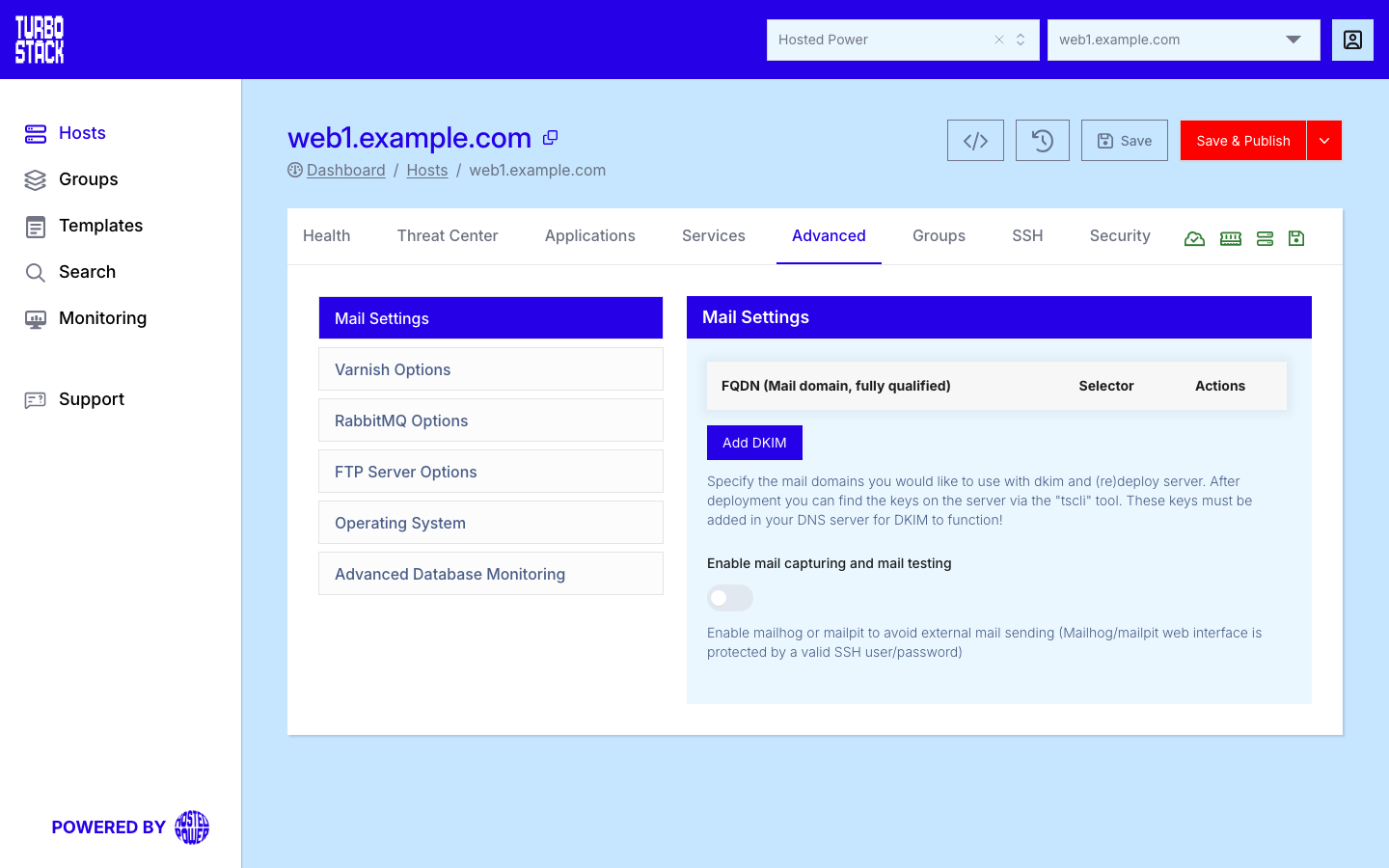
TurboStack is primarily an application-hosting platform. Outbound (transactional) mail is handled by the local mail service on your host. Domain authentication (DKIM) and a development mail-catcher are set up under the host's Advanced > Mail Settings (Advanced).
Sending mail
Your applications send through the local mail service by default - no external SMTP credentials are required for basic delivery. To keep that mail out of spam folders, publish the DNS records below (SPF, DKIM, DMARC). For high-volume or marketing mail, use an external SMTP provider instead.
Common email ports
When you configure an application's outbound mail or a desktop mail client, use these standard ports. Simple Mail Transfer Protocol (SMTP) sends mail; Internet Message Access Protocol (IMAP) and Post Office Protocol version 3 (POP3) read it.
Prefer the encrypted submission ports (587 with STARTTLS, or 465 with implicit TLS) for sending from an application. Port 25 is for server-to-server delivery, not client submission.
Deliverability (DNS records)
To land in inboxes rather than spam folders, authenticate your domain with three Domain Name System (DNS) records. Add these where you manage your domain's DNS. If Hosted Power manages your DNS, add them in the Customer Center DNS management; otherwise add them at your DNS provider - see Connecting your domain.
Set up DKIM
DKIM signs your outbound mail so receiving servers can confirm it genuinely came from your domain. Set it up from the host's Advanced > Mail Settings:
-
Enter the Fully Qualified Domain Name (FQDN) you send mail from.
-
Choose a selector - this becomes the subdomain part of the DKIM record.
-
Connect over SSH and run
tscli dkim recordsto get the DKIM record to publish. -
Add that record as a TXT record in your domain's DNS - in the Customer Center DNS management if Hosted Power manages your DNS, otherwise at your DNS provider.
-
Back on the server, run
tscli dkim validateto confirm the record was created correctly.
SPF record syntax
An SPF record is a single DNS TXT record that starts with v=spf1, lists the mechanisms that authorise senders, and ends with an all mechanism. Each mechanism carries a qualifier that sets the result when it matches.
Examples:
v=spf1 mx -all
v=spf1 ip4:203.0.113.10 include:example.net -all
Keep one SPF record per domain and stay within the 10-lookup limit - see Mail deliverability.
Development mail
Mailpit and Mailhog are development mail-catchers that capture outbound mail so you can inspect it without delivering it. Enable one from Advanced > Mail Settings (the mail capturing/testing option); it is then reachable at https://<hostname>/mailpit or https://<hostname>/mailhog with your system user's credentials. Mailpit is recommended (Mailhog is no longer maintained).
Warning
Never enable a mail-catcher on a production host - it intercepts mail instead of sending it.
Note
For high-volume or marketing email, use a dedicated email/SMTP provider.
Related
- Advanced settings
- Connecting your domain
- Customer Center DNS management - add the SPF, DKIM and DMARC records.
- Mail deliverability - fix mail landing in spam, blocklists and authentication.
- Security hardening checklist
- Hosts