
Threat Center
The Threat Center tab is the security inbox for a single host. It shows what TurboStack's security scanning (TurboRadar) found on that server: known weaknesses in your software, confirmed malware, and suspicious activity caught while the server is running.
For the same view across every host in your account, use Threat Center in the sidebar. This page explains what the findings mean; that one is where you triage a whole fleet.
You do not need to be a security specialist to use it. This page explains each finding type, what the scores mean, and - most importantly - how to decide what to fix first and what to do about it.
Important
Not every vulnerability is equally important - and most are not urgent. A long list of CVEs is
normal; what matters is the handful that are both severe and likely to be attacked. Focus on
findings that combine a high CVSS (severe impact) with a high EPSS (likely to be exploited), plus
anything carrying an Exploited (KEV) or Likely exploited badge. The list
is already sorted by risk score, so these sit at the top - work down from there and do not get
distracted by the low-risk, low-EPSS findings near the bottom. When the host has open Critical
findings, the tab opens filtered on Critical, plus Exposure when there are exposures.
Select All to see the rest. See
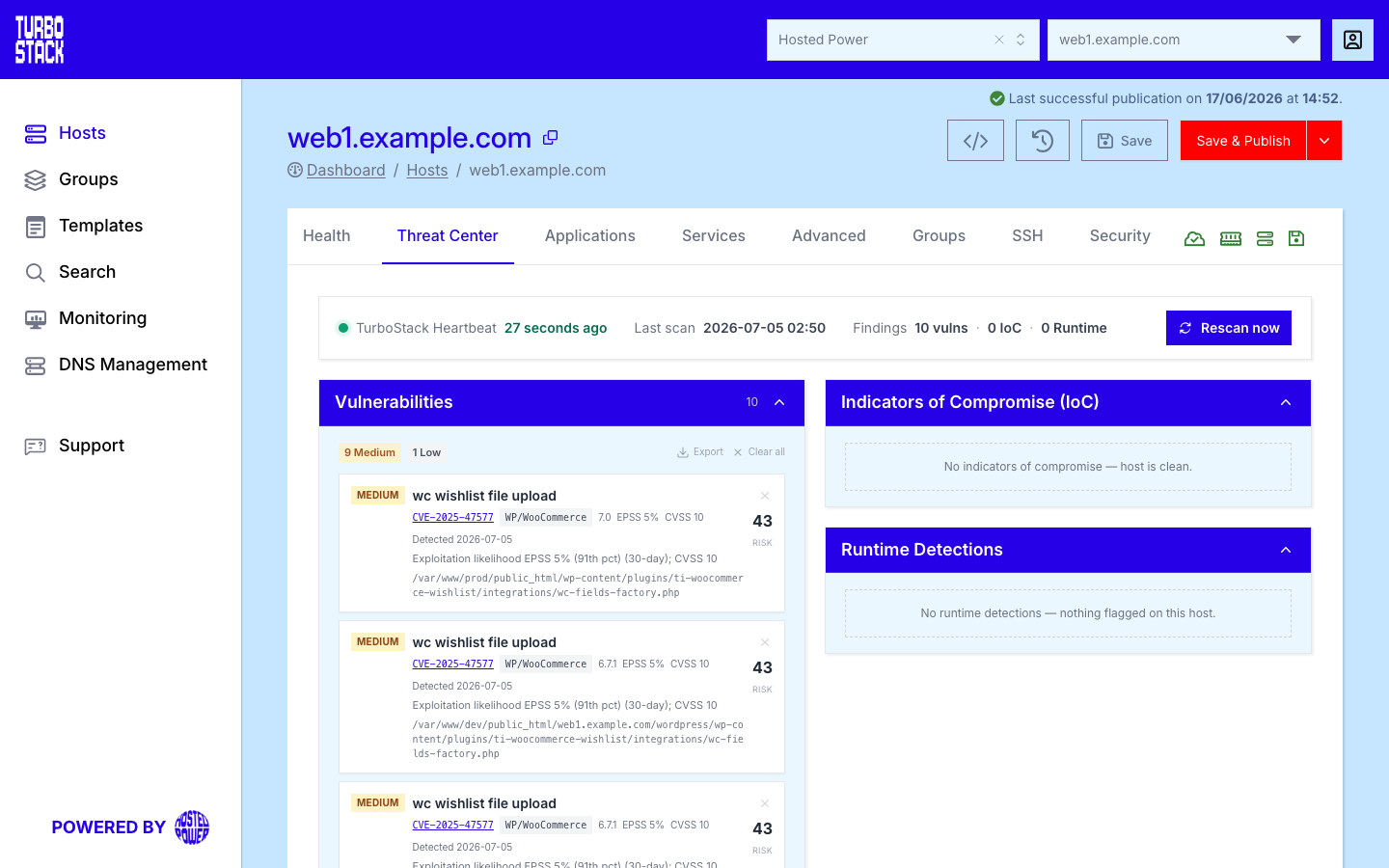
This tab covers:
How scanning works - where the findings come fromReading the security scores - CVE, CVSS, EPSS, KEV and risk scoreHow to decide what to fix first - a simple priority guideVulnerabilities and exposures - known weaknesses in your softwareIndicators of compromise - confirmed malware and suspicious evidenceRuntime detections - suspicious activity caught liveStatus and actions - heartbeat, rescan, export, acknowledge and clear
How scanning works
TurboRadar is TurboStack's security scanning. It runs on the host and reports its findings back to the platform, where they appear in this tab. It looks at three different things:
-
Your software and its dependencies - to find publicly known weaknesses (see
Vulnerabilities ). -
Your files - to find malware such as web shells, backdoors and payment-page skimmers (see
Indicators of compromise ). -
The running system - to catch suspicious behavior as it happens (see
Runtime detections ).
Scans run automatically on a schedule. You can also start one yourself at any time with
Rescan now - do this after you apply a fix, to confirm the finding is gone. The
Reading the security scores
A vulnerability finding can carry several scores. They answer different questions, and reading them together is what tells you how urgent a finding really is. Here is what each one means in plain language.
CVE - the identity of the weakness
A Common Vulnerabilities and Exposures (CVE) identifier is a public, unique name for one
specific security weakness in a piece of software, written as CVE-2024-12345. Anyone in the world
refers to that exact weakness by that ID, and the full description lives in a public database (the
National Vulnerability Database). In the Threat Center, the CVE links to that advisory.
A CVE is only an identifier - it says which weakness was found, not how dangerous or likely it is. For that, read the scores below.
Note
Some findings have no CVE (for example a malware signature). Those show a signature name instead of a CVE.
CVSS - how severe it is
The Common Vulnerability Scoring System (CVSS) is a severity score from 0.0 to 10.0. It rates how much damage the weakness could cause if an attacker exploits it - the technical impact. Higher is worse.
CVSS describes the worst case, not the chance it will happen. A weakness can score 9.8 and still almost never be attacked in practice. That is why you also need EPSS and KEV.
EPSS - how likely it is to be attacked
The Exploit Prediction Scoring System (EPSS) is a percentage from 0% to 100%. It estimates the probability that this weakness will be exploited by attackers in the next 30 days, based on real-world data. Higher means more likely.
-
A high EPSS (for example 80% or more) means attackers are actively targeting this weakness right now, or are very likely to soon.
-
A low EPSS means that, although the weakness exists, it is rarely attacked in practice.
When a finding is not yet confirmed as actively exploited but its EPSS is 80% or higher, the Threat Center shows a Likely exploited badge so you can spot it quickly.
Tip
CVSS and EPSS answer different questions. CVSS = "how bad if it happens". EPSS = "how likely it is to happen". A weakness that is both severe (high CVSS) and likely (high EPSS) is the most urgent.
KEV - confirmed to be exploited right now
Known Exploited Vulnerabilities (KEV) is a public catalogue, maintained by the United States cybersecurity agency (CISA), of weaknesses that are confirmed to be under active attack in the real world. This is the strongest possible signal: it is no longer a prediction.
A finding on this list shows an Exploited (KEV) badge. Treat these as urgent regardless of their other scores.
Risk score - the single number that ranks everything
Reading three scores for every finding is a lot of work. To save you that, TurboStack combines the signals above - whether it is exploited (KEV), how likely it is (EPSS), and how severe it is (CVSS) - into a single risk score, shown as a large number on the right of each finding. Higher means more urgent.
The vulnerabilities list is sorted by risk score, most urgent first, so the findings that need your attention are always at the top. The coloured severity label (Critical, High, Medium, Low, Info) is the priority band that the risk assessment puts the finding in; use the severity filter to focus on a band.
How to decide what to fix first
You rarely need to read every score. For each finding near the top of the list, ask three questions in order, and act on the first one that applies.
Tip
The short version: work from the top of the list down. The list is already ordered by risk, so the first findings you see are the ones that matter most.
Fixing a vulnerability
Most vulnerabilities are fixed by updating the affected software to a version that is no longer vulnerable. Each finding shows the package and its installed version, and - when a fix exists - the Fixed in version (in green).
-
Note the package and the Fixed in version.
-
Update that package to the Fixed in version (or newer). How you do this depends on the component - for example through your application's dependency manager, or by updating the platform, theme or extension that includes it.
-
Publish the change if it is part of your host configuration.
-
Run Rescan now to confirm the finding is gone.
If there is no fix available yet, reduce your exposure in the meantime: keep the Web Application Firewall and TurboShield enabled, and restrict access to the affected area where you can. Re-check after the next scan.
Note
You can dismiss a finding you have reviewed and decided is not relevant to you (for example a weakness in a feature you do not use). Dismiss it from its dismiss action. Dismissing only hides it. It does not fix anything, and the finding comes back if the next scan still detects it.
Understanding false positives (backported patches)
Some findings - often around system packages such as OpenSSH - are false positives. Linux
distributions like Debian fix security issues by backporting the patch into the existing version
without changing the version number. A scanner that only compares version numbers to a CVE database
then flags a package (for example OpenSSH_8.0p1) as vulnerable even though the specific CVE is
already fixed.
TurboStack applies security updates automatically (once a day), so these packages are kept patched. To confirm a specific case over SSH:
dpkg -l | grep openssh     # the installed package (and its patched build)
ssh -V                     # the running OpenSSH version
You can then check whether the CVE is already patched in the distribution's security tracker. If it is, dismiss the finding; if you are unsure, contact support.
Vulnerabilities and exposures
The Vulnerabilities & Exposures panel lists the known weaknesses found in your software and its dependencies. Each finding shows:
-
The title and the CVE identifier, linked to the public advisory (or a signature name when there is no CVE).
-
The affected package or application type, and the installed version.
-
The Fixed in version, when a fix is available.
-
The scores and badges described above: CVSS, EPSS, Exploited (KEV) or Likely exploited, and the combined risk score.
-
When it was first and last detected, and the file path where it applies.
A finding with the violet Exposure badge is reported as an exposure rather than a known software vulnerability. It is ranked and filtered like the others.
Filtering. The chips above the list narrow it: one chip per severity band (Critical, High, Medium, Low, Info) and an Exposure chip. The chips add up, so Critical plus Exposure shows the critical findings and the exposures. All clears every filter. When no finding matches, the panel says "No findings match the active filter."
Group by. The segmented Group by control (None, CVE, Path, Component) collapses related findings into one row. For example, one row per CVE lists how many locations it was found in, and one row per component lists its CVEs. Expand a grouped row to see the members. Dismissing a grouped row asks "Dismiss all?" and dismisses every member.
See
Indicators of compromise
An Indicator of Compromise (IoC) is a trace that your host may have been breached. Most often it is a file found on disk: a web shell, a backdoor, or a skimmer that steals payment details. The panel separates two kinds:
-
Malware - a confirmed malicious file. It is Critical, and a red banner appears ("Confirmed malware detected - immediate action required.").
-
Evidence - suspicious material that needs your review before it counts as an infection. It carries an amber Evidence badge, an amber banner ("Suspicious security evidence detected - review required.") and the priority Info.
The panel header counts them separately ("2 malware", "1 evidence"), or reads "0 IoC" when the host is clean. Each entry shows the detection, the affected application type, the scanner, and the file path of the suspicious file.
Warning
A confirmed malware finding needs immediate action. Suggested steps:
-
Treat the site as compromised. Do not assume it is harmless.
-
Remove the malicious file, or restore the site from a known-clean backup taken before the infection.
-
Change passwords and keys that the host can reach (database, application admin, API tokens).
-
Find and close the entry point - usually an out-of-date application or a vulnerable extension (see
Vulnerabilities ). -
Contact support if you need help with cleanup or investigation.
After cleaning up, run Rescan now to confirm the file is gone.
An IoC you have reviewed and judged harmless can be acknowledged from its row. Acknowledging hides it in TurboStack for this host, also on the account-wide list and on the shield icon of the Hosts list. The finding itself stays in TurboRadar, and Unacknowledge brings it back. The Acknowledged chip shows how many are hidden. Dismiss, in contrast, clears the finding in TurboRadar. It returns if the next scan still detects it.
Runtime detections
Runtime detections are suspicious actions caught while the server is running, rather than found by scanning files. Examples are a web process starting a command shell, or a program running from a temporary folder - patterns that often indicate an intrusion in progress.
Each detection shows a severity (for example CRITICAL or WARNING), the rule that matched, the source or container it came from, a timestamp, and the command or file path involved.
Unlike vulnerabilities, these are a live stream of events and can include occasional false alarms (for example a maintenance script doing something unusual). Review each one:
- If you recognise it (for example it matches a deploy or a task you ran), it is expected.
- If it is unexpected, treat it like a possible compromise and follow the steps under
Indicators of compromise .
Status and actions
The header shows the host's reporting status and the controls for the tab.
-
TurboStack Heartbeat - whether the host is currently sending data. A fresh heartbeat (within a few minutes) confirms the scanning is connected. "No signal yet" means the host has not reported recently; if it persists, contact support.
-
Last scan - when the most recent scan finished, or "never" if none has run yet.
-
A findings summary: total vulnerabilities (with the Critical count), the IoC count split into malware and evidence, and runtime events. The runtime count turns red when there are CRITICAL events.
Available actions:
-
Rescan now - start a fresh scan. The status first reads "Rescan requested - waiting for the node..." or "Rescan queued - waiting for the node...". Then progress is shown as each scanner finishes. The button stays disabled until the scan completes, also after you refresh the page. Use it after applying a fix to confirm the finding is resolved.
-
Export - download the current list as a CSV (comma-separated values) file, for example to share with a developer or track in a spreadsheet. The vulnerabilities export includes a Detections and a Locations column.
-
Clear all - clear the findings in the current list (asks for confirmation). You can also dismiss findings one at a time. Cleared vulnerabilities and IoCs come back if the next scan still detects them. Cleared runtime events are deleted for good.
-
Acknowledge - on an IoC, hide it in TurboStack without clearing it (see
Indicators of compromise ).
Tip
For how these protections work across the whole platform, see the Security overview.
Related
- Threat Center (all hosts) - the same findings across your whole account
- Security overview (how protection works)
- Security (configuration)
- Backups
- Glossary
- Hosts